Route Planning for Mobile Groomers: See Your Day on Teddy's Appointments Map
See every stop numbered on a map, with a route line in stop order, and open it in Google Maps.



Quick answer: In Teddy, mobile groomers plan the day from the calendar. Tap Map to open Appointments Map: your stops in a numbered list, pins on a map, and a route line drawn in stop order. When you're ready to drive, tap Open in Google Maps. Ask Teddy can also plan your route, and Appointments Map is on every plan. Teddy doesn't send clients new arrival times on its own, so you text them yourself.
A mobile grooming day booked in the order the calls came in can mean crossing town twice. You finish on Maple Avenue, drive across to Pine Road, then head right back to Maple. Seeing the whole day on a map, before you leave the driveway, is the fastest way to spot that.
Here's how to plan your route in Teddy with Appointments Map, and how to keep clients in the loop when times change.
Appointments Map: your day, stop by stop
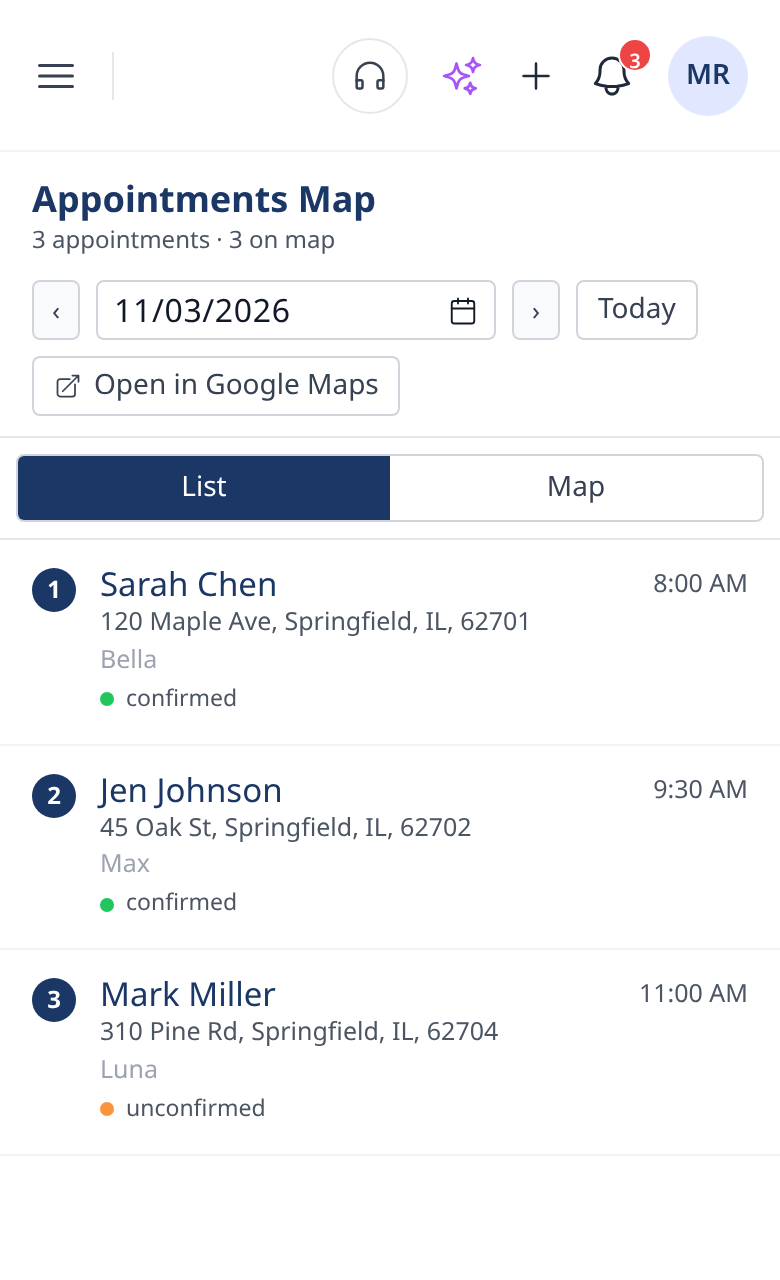
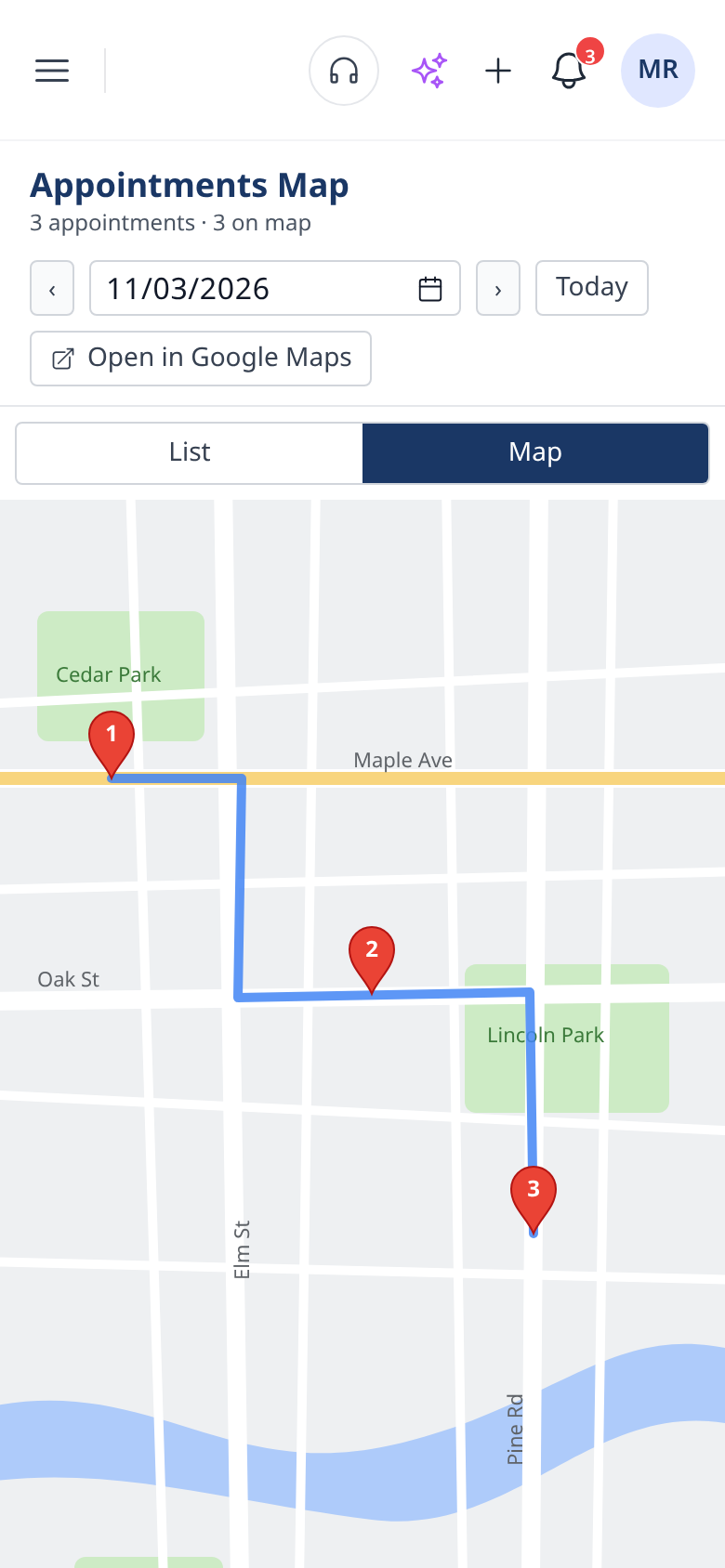
On the calendar, tap the Map button. It opens Appointments Map, which shows the day two ways:
- A numbered List of your stops in order, so you know who's first, second and third.
- A Map with a pin for each stop and a route line drawn in stop order.
Seeing the line makes a zigzag day obvious. If the route doubles back across town, you'll see it right away.

Hand off to Google Maps for the drive
When you're ready to go, tap Open in Google Maps. Your stops open there for turn-by-turn directions, so you don't have to type addresses into your phone between dogs.

How to plan tomorrow's route
- Open tomorrow on the calendar and tap Map.
- Look at the route line. Does it double back? Are two stops on the same street hours apart?
- Fix the order on the calendar. Move appointments so nearby stops sit next to each other. You can drag an appointment to a new time, or ask Teddy: "Move Max to 1:30 tomorrow."
- Check the map again. The route line follows your new stop order.
- Text anyone whose time changed. More on that below.
Prefer not to do it by hand? Ask Teddy can plan a mobile groomer's route for you. Type something like "Plan my route for tomorrow," then check the route line on Appointments Map.
Let clients know about new times
When you change the order of your day, some clients will see you earlier or later than they expected. Teddy doesn't send clients new arrival times on its own, so give them a heads-up yourself. The easy way is to ask Teddy, one client at a time:
- "Text the Johnsons that I'll be there around 10:30 instead of 11"
- "Text Max's owner that I'm on my way"
Teddy drafts the text and sends it after you confirm. Texting is unlimited on every plan, so there's no reason to skip the heads-up. See texting and reminders for more.
A sample day, before and after
Say you have five stops tomorrow. They were booked in the order clients called: one on Maple Avenue, then Pine Road across town, back to Maple, then two on Oak Street. On Appointments Map, the route line zigzags.
Move things around so both Maple stops come first, then the two on Oak, then Pine at the end. Same five dogs, same day, and the line on the map now runs in one direction instead of crossing back and forth.
Tips for a tighter mobile day
- Keep addresses complete. The map is only as good as the addresses on your clients' records. Check new clients' addresses when you book them.
- Plan the night before. Look at tomorrow's map while you still have time to text clients about new times.
- Group by area when you book. When a client in a neighborhood you already visit calls, offer them the day you're nearby. Asking "What's open Friday afternoon?" helps you find it fast.
- Leave buffer for the hard ones. A matted doodle or a nervous senior dog can run long. Leave room after them so one groom doesn't push the whole day.
- Re-check after changes. If someone cancels or you add a stop, open the map again.
Salon or mobile?
Route planning is for mobile groomers driving between stops. If you work from a salon, the map won't do much for you. Salons get more from the calendar's day, week and staff views. Both are covered on the calendar and scheduling page.
Which plan includes it?
Appointments Map is on every plan, including Budget, and Ask Teddy can plan your route on every plan too. Compare plans on the pricing page, and see route optimization for more.
Running Teddy from the van
Teddy runs in your phone's web browser, so there's nothing to download. Open it between stops to check your next address on the map, or text a client.
Comparing mobile grooming software? Our guide to mobile pet grooming software for solo and fleet groomers covers the wider picture.
Ready to drive less and groom more? Get started for free. No credit card needed.
Frequently Asked Questions
How do I see my route in Teddy?
On the calendar, tap Map to open Appointments Map. It shows your stops in a numbered list and on a map, with a route line drawn in stop order.
Can I get turn-by-turn directions?
Yes. In Appointments Map, tap Open in Google Maps and your stops open there for directions.
Do clients get new arrival times automatically?
No. Teddy doesn't send clients new arrival times on its own. You can ask Teddy to text a client about a new time, and it sends after you confirm.
How do I change the order of my stops?
Move appointments on the calendar so nearby stops sit next to each other, by dragging them or asking Teddy. The route line follows your stop order.
Is route planning useful for salons?
Not really. It's built for mobile groomers driving between stops. Salons usually get more from the calendar's day, week and staff views.