
Is There a Teddy Grooming App? How to Run Your Day From Your Phone
Open the Teddy web app on your phone, add it to your home screen, and run the calendar, booking and texting from there.



Quick answer: Yes, you can run Teddy on your phone. There is no app store download. Open the Teddy web app in your browser at https://app.tryteddy.com, then add it to your home screen in about 10 seconds. It's the same login and the same calendar. Check the day's book, book or move an appointment, text a client and ask Teddy for help, all from your phone. You can also ask by voice using your phone's talk-to-type, then review and confirm before anything is booked or sent. Each staff member picks their own text and email alerts in Settings > Staff > Edit Staff > Notifications, so those alerts can reach any phone.
You're between dogs, or out in the van, and an owner texts to move Saturday's appointment. You shouldn't have to get back to a computer to fix the book.
You don't. There is no app store download. Open the Teddy web app in your browser at https://app.tryteddy.com, then add it to your home screen in about 10 seconds. It's the same login and the same calendar, on iPhone and on Android. You can check the calendar, book or move an appointment, and text a client from the front desk, the van, or the table next to a doodle who's still drying. If you'd rather tap than type, the usual screens are still there.
A dog grooming app for your phone should let you run the book, not just glance at it. Once Teddy is on your home screen, here's how to do that.
What you can do on your phone
You don't need a desk to run the book. From your phone you can:
- Open the calendar in day, week or staff view and see today's appointments
- Book, reschedule or cancel an appointment, either by tapping or by asking Teddy
- Ask for the soonest opening and confirm it once you see the preview
- Text a client, and read their reply on that client's record
- Ask Teddy in plain words, then confirm before anything changes
Unlimited appointments and unlimited two-way texting are on every plan, including Budget at $49. Automated reminders, online booking and mobile route optimization start on Core at $99. Staff permissions and recurring appointments are also on every plan. See the full list on the features page.
How to run your grooming business from your phone
Start with today's calendar
Open the calendar and switch to day view. You'll see the next appointment, who's on the book, and where the gaps are. Week and staff views are there too if you have a team, or if you want the shape of the week. Check-in and check-out are built into the calendar, so you can mark pets in and out as the day goes.
Book and move appointments as you go
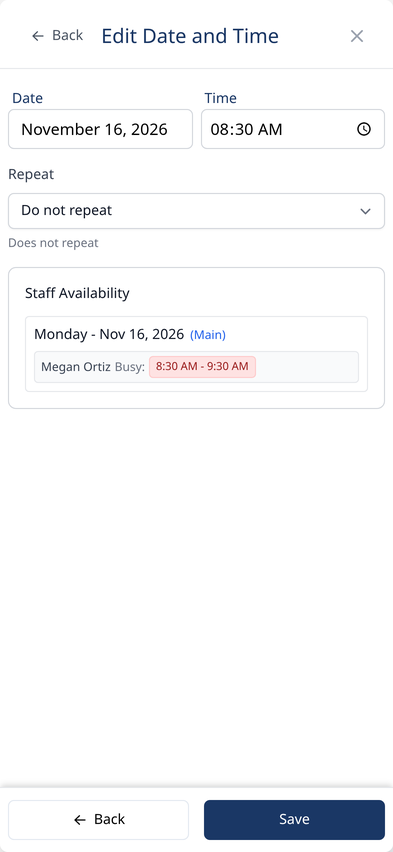
When an owner is at the counter, or when someone texts to change a time, you can book or move the appointment from your phone. Ask Teddy in one sentence, like "Book Bella for a full groom five weeks from Friday" or "Move the Johnsons to next Thursday." Teddy checks the schedule, shows you a preview, and only books it when you confirm. You can also tap through the calendar screens if you prefer.
Teddy checks the schedule before it confirms anything, so you don't double-book.

Text clients from the same phone
Two-way texting lives in Teddy, so you can text a client and see the reply on that client's record, not in a separate inbox. Ask Teddy to draft the text, review it, and confirm before it sends. Texting is unlimited on every plan, with no per-message fees.
Ask Teddy, by text or by voice
Type what you need in plain words, or ask by voice using your phone's talk-to-type, then send it to Teddy. Teddy previews the change and waits for your okay. Nothing is booked, moved or sent until you confirm.
Getting Teddy on your phone
There is no app store download. On your phone, open the Teddy web app in your browser at https://app.tryteddy.com. Sign in with the same login you use on a computer. You'll see the same calendar.
Then add it to your home screen. That gives you a Teddy icon that opens full screen, without the browser bar. It takes about 10 seconds.
On iPhone, open Teddy in Safari, tap Share, then tap Add to Home Screen.
On Android, open Teddy in Chrome, then tap Add to Home screen. Some phones show Install app instead. Either one puts Teddy on your home screen.
After that, open Teddy from the icon when you want to run the book.
Staying on top of the day
Each staff member picks their own alerts in Settings > Staff > Edit Staff > Notifications. The alerts are texts and email, so they reach any phone.
A text alert can go to their mobile when:
- A client calls, with a link to call back
- A new online booking comes in (online booking starts on Core at $99, so this alert is not on Budget)
- A new intake form is submitted
- A client sends a new text
- A new Google review comes in
There's also an email option for a call summary after a client call.
You can still check the calendar and review texts in the client's thread from your phone, whenever you need to.
A simple phone routine
- Open today's calendar in day view and scan the book.
- Check in the first pet when they arrive.
- Rebook regulars at pickup, from your phone, before they walk out.
- Text clients who need a change or a due reminder, and confirm any Ask Teddy draft before it sends.
- Check messages and the rest of the day's book between dogs.
Ready to try it on your own book? Get started for free. No credit card needed.
Frequently Asked Questions
Is there a Teddy grooming app?
There is no app store download. Open the Teddy web app in your browser at https://app.tryteddy.com, then add it to your home screen. On iPhone, that's Share, then Add to Home Screen. On Android, that's Add to Home screen, or Install app. You'll get a Teddy icon that opens full screen, with the same login and the same calendar.
Does Teddy work on Android?
Yes. On Android, open the Teddy web app in Chrome at https://app.tryteddy.com, then add it to your home screen. Some phones show Add to Home screen, and some show Install app. Either way, you get a Teddy icon that opens the same calendar you already use.
Can I book and text from my phone, or only look at the calendar?
You can book, reschedule, cancel and text from your phone. Ask Teddy shows a preview and waits for you to confirm before anything changes. Unlimited appointments and unlimited two-way texting are on every plan.
What does "ask by voice" mean?
You can ask by voice using your phone's talk-to-type, then review Teddy's preview and confirm. It is the same confirm-before-action flow as typing. This is your phone's built-in talk-to-type with Ask Teddy, not a separate Teddy voice feature.
Does Teddy send notifications to my phone?
Each staff member picks their own alerts in Settings > Staff > Edit Staff > Notifications. The alerts are texts and email, so they reach any phone. A text can go out when a client calls (with a link to call back), a new online booking comes in, a new intake form is submitted, a client sends a new text, or a new Google review comes in. The online booking alert needs Core, because online booking starts on Core at $99. There's also an email option for a call summary after a client call.
Can I run my grooming business from my phone?
Yes. From your phone you can check the calendar, book or move appointments, text clients and ask Teddy for help. You do not need to wait until you're back at a computer.


