Keep Regulars on Schedule: Rebooking, the Waiting List and No Double-Booking in Teddy
Rebook regulars, fill cancellations from the waiting list and never double-book in Teddy.



Quick answer: Teddy helps you keep regulars on schedule in three ways. Ask for the soonest opening and rebook at pickup in one sentence. Fill cancellations from the waiting list. And let Teddy check the schedule before it confirms anything, so you never double-book. The calendar, waiting list and unlimited appointments are on every plan.
Regulars are the backbone of a grooming business. A doodle on a six-week cycle is worth far more over a year than a one-time bath. The trick is keeping them on that cycle without spending your evenings on the phone.
Here's how to use Teddy's calendar to rebook regulars, fill the gaps when someone cancels, and stop double-booking for good.
Rebook at pickup, in one sentence
The best time to book the next groom is while the owner is standing at your counter admiring the result. The worst time is three weeks later, when your book is already full.
With Teddy, rebooking takes one sentence. Ask:
- "Find the soonest full-groom opening for Bella"
- "Book Daisy for a bath Tuesday at 10"
Teddy returns the soonest slot that fits as a booking preview, with the groomer, the time and the next few openings. Tap Confirm and it's on the calendar. Want one of the other times? Tap Keep chatting and ask for it.

For clients who come in on a set rhythm, Teddy also supports recurring appointments, so you don't have to rebook every visit by hand.
Fill cancellations from the waiting list
Cancellations happen. The difference between a lost slot and a full day is how fast you can fill it.
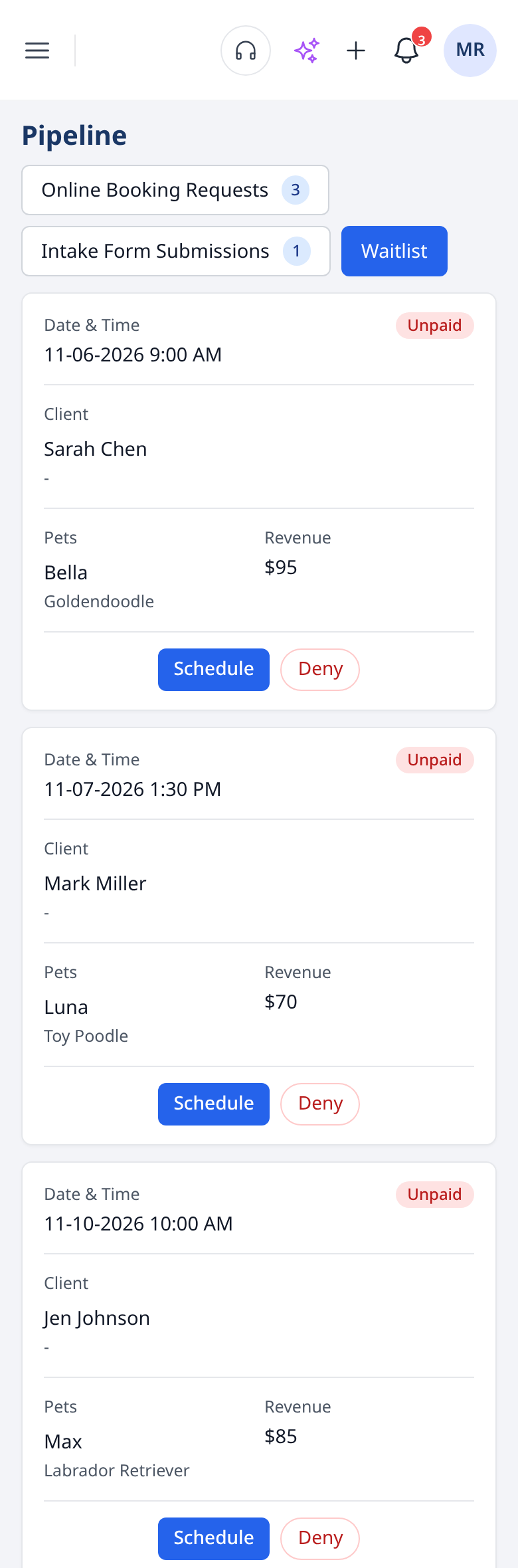
Teddy keeps a waiting list for exactly this, on the Waitlist tab under Pipeline. Each card shows the date and time, the client, their pets and the revenue, with Schedule and Deny buttons. When a client wants in sooner than you have room for, add them. When a slot opens, you know who to offer it to, and Schedule puts them on the calendar.
Pair the waiting list with a quick text. Two-way texting is unlimited on every plan, and you can ask Teddy to text a client straight from chat: "Text Sarah that we have a 10 AM opening tomorrow for Bella." Teddy drafts it and sends after you confirm.
Never double-book
Double-booking is the fastest way to ruin a Saturday. Teddy checks the schedule before it confirms anything, and it shows you each appointment for approval before it lands on your calendar.
You can still click and drag appointments to a new time or day if you prefer. Or ask: "Move the Johnsons to next Thursday," and Teddy updates it after you okay it.

See your book the way you need to
Teddy's calendar has three views:
- Day: what's happening today, hour by hour.
- Week: the shape of your week at a glance.
- Staff: each groomer's book side by side, if you have a team.
Unlimited appointments are on every plan, from Budget up. Check-in and check-out let you track who's on site. See the full list on calendar and scheduling.
Reminders that keep regulars coming
Booking the appointment is half the job. Making sure they show up is the other half.
On Core ($99) and up, automated text and email reminders go out before every appointment on their own. On Budget, you can text clients yourself, or ask Teddy to send a reminder, with unlimited two-way texting. More on texting and reminders.
Win back regulars who drifted
Some regulars slip off their cycle without meaning to. Life gets busy. A friendly text often brings them back. Text them one at a time from Ask Teddy, like "Text Luna's owner that we miss her and ask if she'd like to book," review the draft, and confirm.
A simple rebooking routine
- At checkout, offer the next groom. Ask Teddy for the soonest matching opening around the right interval.
- Book it before they leave. Confirm in Teddy while they're still there.
- Add anyone who wants sooner to the waiting list.
- When someone cancels, check the waiting list first and text the next person.
- Once a month, text a few regulars you haven't seen in a while, one at a time.
That routine takes a few minutes a day and keeps your book full of the clients you already know.
Why the calendar and Ask Teddy work together
Rebooking usually breaks down because it takes too many taps at the busiest moment of the day. The owner is at the counter, the next dog is waiting, and you're trying to find a slot six weeks out. Ask Teddy turns that into one sentence. You ask, Teddy finds the slot and shows you the booking, and you confirm. It's on every plan, including Budget at $49, so you can rebook every regular before they walk out the door. Compare what each plan includes on the pricing page.
Things you can just ask
- "What's open Friday afternoon?"
- "Find the soonest full-groom opening for Bella"
- "Move the Johnsons to next Thursday"
- "Book Daisy for a bath Tuesday at 10"
Teddy runs in the web browser on your phone, tablet or computer, so you can rebook from the counter or between stops with nothing to download.
Comparing calendar tools? Our roundup of the best dog grooming scheduling apps covers the main options.
Ready to keep your regulars on schedule? Get started for free. No credit card needed.
Frequently Asked Questions
Will Teddy ever double-book me?
No. Teddy checks the schedule before it confirms anything, and shows you each appointment for approval before it lands on your calendar.
How do I rebook a regular quickly?
Ask Teddy for the soonest opening, like "Find the soonest full-groom opening for Bella." It shows the soonest slot that fits as a booking preview, with the next few openings. Tap Confirm to book it.
Does Teddy have a waiting list?
Yes. It's the Pipeline > Waitlist tab. Each card shows the date and time, client, pets and revenue, with Schedule and Deny buttons, so you can fill cancellations fast.
Is there a cap on appointments?
No. Unlimited appointments are included on every plan, from Budget up.
Does Teddy send reminders automatically?
Automated text and email reminders start on Core at $99 a month. On Budget, you can text clients yourself or ask Teddy to send a text, with unlimited two-way texting.