.png)
How to Organize and Manage Grooming Client Files
Systems for managing grooming records whether you're digital, paper, or somewhere in between

%20How%20to%20Organize%20and%20Manage%20Grooming%20Client%20Files.avif)


Good client records make everything easier. You know the dog's history, remember special requests, track health concerns, and deliver consistent service.
Poor records mean asking the same questions every visit, forgetting important details, and looking unprofessional.
Here's how to organize client information so it's useful, accessible, and manageable.
What to Keep in Client Files
Essential Information
Client Contact Details:
- Full name
- Phone (primary and backup)
- Email address
- Physical address (for mobile groomers)
- Emergency contact
Pet Information:
- Name, breed, age, weight
- Sex (spayed/neutered status)
- Coat type and color
- Veterinarian contact
Grooming Specifics:
- Preferred style/cut
- Products used (especially if sensitivities)
- Typical services
- Grooming frequency
History:
- Visit dates and services
- Pricing for reference
- Notes from each appointment
- Any issues or incidents
Health and Behavior:
- Allergies or sensitivities
- Medical conditions
- Behavioral notes (anxious, aggressive triggers, special handling)
- Vaccination status
Paper vs. Digital Systems
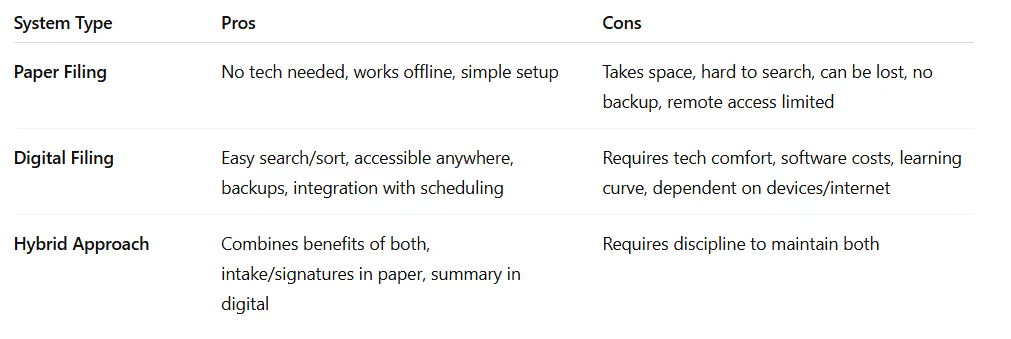
Many groomers keep digital primary records but maintain paper forms for intake, signatures, and appointment notes that get summarized digitally later.
Setting Up Paper Files
Filing System: Alphabetical by client last name is standard. Some groomers file by pet name instead.
File Folder Contents:
- Client information form (contact details)
- Pet profile sheet(s)
- Signed service agreement
- Vaccination records
- Visit log or appointment cards
- Notes pages
File Storage: Filing cabinet or banker's boxes. Keep current/active clients accessible; archive inactive clients (no visits in 12+ months) separately.
Labeling: Clear, consistent labels. Include client name and primary pet name for quick identification.
Setting Up Digital Files
Option 1: Spreadsheet
Google Sheets or Excel can track basic client information.
Columns to Include:
- Client name, contact info
- Pet name, breed, age
- Last visit, next due
- Notes
Pros: Free, flexible, familiar
Cons: Not designed for client management, unwieldy at scale
Option 2: Grooming Software
Purpose-built platforms handle client management alongside scheduling.
Features to Look For:
- Client and pet profiles
- Visit history
- Notes and photos
- Service tracking
- Vaccination reminders
Most efficient once client volume grows.
Option 3: General CRM
Tools like Airtable or Notion can be configured for client management.
Flexible, good middle ground for tech-comfortable groomers. Less specialized than grooming software.
Creating Useful Client Profiles
Beyond Basic Info
The difference between adequate and excellent records is the details that help deliver better service.
Style Preferences:
- "Short all over, leave ears fluffy"
- "Teddy bear face, scissor body"
- "Natural feet, clean between pads"
Behavioral Notes:
- "Nervous first 10 minutes, then relaxes"
- "Sensitive about feet"
- "Loves dryer, hates nail Dremel"
- "Does better with breaks"
Client Preferences:
- "Always wants nail polish"
- "Prefers morning appointments"
- "Asks for photos texted after"
- "Price sensitive—don't suggest add-ons"
Photos: Before/after photos maintain consistency.
Visit Documentation
What to Record Each Visit:
- Date
- Services performed
- Products used
- Any issues or observations
- Price charged
- Next appointment scheduled
Quick Notes Examples:
- "Matted behind ears—discussed with owner"
- "New hot spot on hip, recommended vet check"
- "Owner requested shorter this time"
- "Excellent behavior throughout"
Shorthand System:
- "NI" = no issues
- "MB" = mats brushed out
- "FC" = face cleaned
- "SN" = sensitive nails
Use consistently.
Managing Vaccination Records
What to Track:
- Vaccination type
- Date given
- Expiration date
Storage: Copies in client files (digital or paper).
Reminders: Flag expiring vaccinations and contact clients before their next appointment.
Verification: Confirm vaccination status at check-in, especially for new or updated clients.
File Maintenance
Regular Updates: Review and update contact info periodically.
Good times to verify:
- First appointment of the year
- When you notice bounced messages
- When appointments are missed
Archiving Inactive Clients: Clients with no visits in 12-18 months can be moved to inactive status.
Deleting Records: Legal requirements vary. Generally keep 3-5 years; digital storage may allow indefinite retention.
Backup: Digital files require regular backups. Cloud systems often auto-backup.
Privacy and Security
Protecting Client Information: Handle names, addresses, phones, and emails responsibly.
Physical Security:
- Lock filing cabinets
- Don't leave files visible
- Shred documents when disposing
Digital Security:
- Strong passwords
- Keep software updated
- Use reputable software
- Avoid shared logins
Sharing Information: Only with permission (vet requests, emergency contacts, or explicit client consent).
Using Files for Better Service
Before Appointments: Review files; remember special requests, behavioral notes.
During Appointments: Note anything relevant for next time.
For Follow-Ups:
- Health concerns
- Rebooking reminders
- Birthday or anniversary acknowledgments
For Business Insights: Aggregate data reveals:
- Most popular services
- Average visit frequency
- Revenue per client
- Seasonal trends
Common Organization Mistakes
- Not Recording Enough: Vague notes are unhelpful.
- Recording Too Much: Avoid overload; focus on impactful details.
- Inconsistent Systems: Use a single system for all clients.
- Not Reviewing Before Appointments: Files only help if referenced.
- Never Cleaning Up: Periodic review keeps records current.
Frequently Asked Questions
How Long Should I Keep Client Records?
Minimum 3-5 years after last visit. Many groomers keep digital records indefinitely.
What if a Client Asks to See Their File?
Generally, share information freely. Policies may restrict sharing behavioral notes verbatim.
Should I Track Client Spending?
Yes—helps analyze revenue per client, visit frequency, and most valuable clients.
How Do I Transition from Paper to Digital?
Enter new clients digitally. Migrate active clients over time. Archive inactive paper files.
What's the Minimum I Should Record?
Contact info, pet details, visit dates, and services—enough for consistent service.