.png)
Best Pet Grooming Software with Payment Processing
Find the best pet grooming software with built-in payment processing.



Getting paid shouldn’t be complicated. The best grooming software handles payments alongside scheduling and client management—no separate systems, no manual reconciliation.
Teddy is pet grooming software that handles card payments, tips, and receipts through Square on every plan, with no added payment fees from Teddy, and unlimited two-way texts starting at $49/month. Try Teddy free for 14 days, no card required.
This guide covers grooming software with built-in or integrated payment processing for 2026.
What Payment Features Matter
For groomers, payment processing should:
- Accept cards easily — Swipe, tap, or manual entry
- Track transactions — Know who paid what and when
- Handle tips — Capture and record gratuities
- Integrate with scheduling — Tie payments directly to appointments
- Offer reasonable fees — Competitive transaction rates
- Work mobile — Process payments anywhere
The best platforms make payments seamless within your existing workflow.
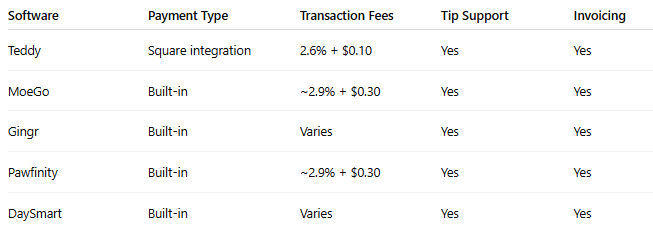
Quick Comparison
Teddy – Best Square Integration
Free Trial: 14 days
Teddy integrates directly with Square for payment processing. If you already use Square, setup is seamless. If you don’t, Square is easy to configure.
Why It Excels at Payments
- Square integration — Industry-standard POS
- Simple transactions — Process directly from appointment screen
- Tip management — Capture and track gratuities
- Full transaction history — Complete payment records
- Hardware compatibility — Works with Square readers
Payment Details
- Fees: 2.6% + $0.10 per transaction (Square rate)
- Hardware: Tap, chip, and swipe readers
- Invoicing: Available
- Online payments: Supported
Pros
- Trusted Square infrastructure
- Easy setup
- Strong hardware options
- Competitive fees
Cons
- Square-only processing
- Requires Square account
- No native built-in processor
Best For
Groomers who already use—or want to use—Square.
MoeGo – Best Built-In Processing
Price: Starting at $69/month
Free Trial: 14 days
MoeGo offers fully built-in payment processing—no external accounts required. Everything operates within one platform.
Why It Excels at Payments
- Native processing — No third-party accounts
- Multiple payment types — Card, cash, check tracking
- Package sales — Sell bundled grooming services
- Professional invoicing
- Detailed revenue reporting
Payment Details
- Fees: Approximately 2.9% + $0.30 (varies)
- Hardware: Compatible readers
- Invoicing: Full-featured
- Online payments: Supported
Pros
- True all-in-one system
- Package sales included
- Strong reporting tools
- Simplified management
Cons
- Higher base subscription
- SMS costs extra
- Rates may be slightly higher than standalone processors
Best For
Salons wanting complete payment management within one system.
Gingr – Best for Multi-Service Payments
Price: Starting at $99/month
Free Trial: Demo available
Gingr is built for facilities offering grooming, boarding, daycare, and retail—all within one billing system.
Why It Excels at Payments
- Multi-service billing — Combine grooming, boarding, retail
- Package management
- Gift card functionality
- Membership billing — Recurring subscriptions
- Advanced invoicing
Payment Details
- Fees: Varies by plan and volume
- Hardware: Multiple supported options
- Invoicing: Comprehensive
- Online payments: Full portal integration
Pros
- Handles complex billing
- Gift cards and memberships
- Strong reporting
- Ideal for larger facilities
Cons
- Expensive for grooming-only businesses
- More complex system
- Steeper learning curve
Best For
Multi-service pet care facilities with advanced billing needs.
Pawfinity – Best for Growing Payment Needs
Price: Starting at $60/month
Free Trial: 14 days
Pawfinity scales with your business. Payment features expand as you upgrade tiers.
Why It Excels at Payments
- Built-in processing
- Package sales (higher tiers)
- Gift cards (higher tiers)
- Scalable feature set
- Strong reporting tools
Payment Details
- Fees: Approximately 2.9% + $0.30
- Hardware: Standard readers supported
- Invoicing: Available
- Online payments: Supported
Pros
- Grows with your business
- Balanced feature set
- Reasonable pricing
Cons
- Advanced features require upgrades
- SMS tier-limited
- Mid-range pricing
Best For
Growing businesses that need payment features to scale over time.
DaySmart – Best Budget Payments
Price: Starting at $29/month
Free Trial: 14 days
DaySmart offers built-in payment processing at the lowest monthly cost.
Why It Excels at Payments
- Affordable monthly plan
- Built-in processing
- Essential payment tools
- Proven reliability
Payment Details
- Fees: Varies by plan
- Hardware: Standard readers
- Invoicing: Basic functionality
- Online payments: Limited
Pros
- Lowest cost option
- Stable platform
- Covers core needs
Cons
- Dated interface
- SMS costs extra
- Limited advanced tools
Best For
Budget-conscious groomers who need simple, reliable payment processing.
Understanding Transaction Fees
Payment processing always includes transaction fees. Here’s what to expect.
Typical Fee Structures
Card-present (tap/swipe):
- 2.6% + $0.10 (Square)
- 2.7% + $0.05 (some processors)
- ~2.9% + $0.30 (built-in systems)
Card-not-present (manual/online):
- 2.9% + $0.30 (typical)
- 3.5% + $0.15 (Square keyed entry)
Fee Comparison on a $75 Appointment
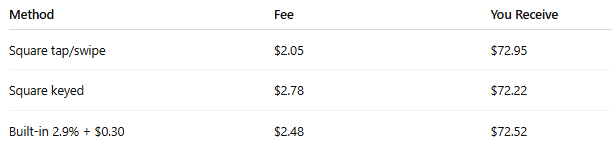
Small differences per appointment can add up over time.
Hardware Options
Card Readers
Square options:
- Magstripe reader — $10
- Contactless + chip reader — $49
- Square Terminal — $299
General readers:
- Bluetooth-compatible
- Typically $30–$100
- Check platform compatibility
Mobile Grooming Considerations
Mobile groomers need:
- Battery-powered readers
- Bluetooth connectivity
- Phone/tablet compatibility
- Reliable performance in varied locations
Square readers pair well with Teddy for mobile setups.
Tip Management
Tips are a major income source for groomers.
Capture Tips
- Prompt at checkout
- Suggested percentages (15%, 20%, 25%)
- Custom entry option
Track Tips
- Record amounts
- Associate with specific groomer
- Tax reporting support
Report Tips
- Daily, weekly, monthly totals
- By groomer (salon view)
- Exportable reports
All reviewed platforms support basic tip functionality.
Invoicing Features
Sometimes payment isn’t collected immediately.
Invoice Capabilities
- Professional invoice generation
- Email delivery
- Payment tracking
- Reminder notifications
When Invoicing Matters
- Corporate accounts
- Insurance billing
- Delayed payments
- Membership or package billing
MoeGo and Gingr offer the strongest invoicing systems. Teddy and DaySmart cover essentials.
Package and Prepaid Sales
Selling service bundles improves retention and cash flow.
Package Features
- Bundle offers (e.g., 5 grooms for price of 4)
- Redemption tracking
- Expiration management
- Usage reporting
Platforms Supporting Packages
- MoeGo — Full management
- Gingr — Advanced features
- Pawfinity — Higher tiers
- DaySmart — Basic options
- Teddy — Not currently supported
Online Payment Features
Online payments enable:
Deposits
- Collect at booking
- Reduce no-shows
- Store card on file
Post-Service Payments
- Send digital payment requests
- Contactless checkout
Online Package Sales
- Sell packages through portal
- Online gift cards
MoeGo and Pawfinity offer the strongest online payment systems.
Security Considerations
Payment processing requires strong security.
PCI Compliance
All major processors are PCI compliant. You don’t store card data—the processor handles security.
Card-on-File
- Secure tokenization
- Enables no-show charges
- Convenient for clients
Fraud Protection
Built-in fraud monitoring protects against chargebacks.
Accounting Integration
Payment data should integrate smoothly with accounting.
Export Options
- Transaction reports
- Payment summaries
- Tip breakdowns
- Service-level sales
Accounting Compatibility
- QuickBooks integration (varies)
- Xero (limited support)
- CSV exports (universal option)
Many groomers rely on report exports for bookkeeping.
Frequently Asked Questions
Should I choose built-in processing or Square?
If you already use Square, stick with it. If starting fresh, built-in processing is simpler. Fees are comparable.
Can I accept cash?
Yes. All platforms allow manual recording of cash transactions.
What about Venmo or PayPal?
They work independently but don’t integrate natively—requiring manual tracking.
Do I need a separate merchant account?
No. Square and built-in processors handle merchant services.
How do I charge no-show fees?
Use card-on-file functionality during booking to charge if needed.
Our Recommendation
For Square users: Teddy integrates seamlessly and offers competitive pricing.
For an all-in-one solution: MoeGo delivers built-in processing and strong package features.
For complex billing: Gingr handles multi-service facilities with advanced tools.
For budget setups: DaySmart provides basic payment functionality at the lowest monthly cost.
Payment processing is essential—but it shouldn’t be the only factor. Choose software that fits your overall workflow, then ensure payments integrate smoothly within that system.